找回密码
 注册
LabVIEW+单片机学习套件全套教程资料下载[免费]LabVIEW论坛精华列表贴USB0816数据采集卡《LabVIEW宝典》
LabWindows/CVI论坛精华贴NET0816以太网数据采集卡RC0210远程设备授权系统 关闭关停锁定打开设备 户外分布式数据采集
NET1624低速高精度以太网数据采集卡WIFI0824SD无线WIFI网络数据采集卡脱机运行 SD存储 小尺寸微型 串口采集远程采集 安卓 手持移动采集 纪录仪
查看: 3299|回复: 5

JKI VI Tester for LabVIEW

[复制链接]
发表于 2009-2-17 21:04:57 | 显示全部楼层 |阅读模式
A unit testing framework for LabVIEW,
built on the software engineering industry's proven xUnit architecture.

About VI Tester

VI Tester is a software test framework for LabVIEW that allows software developers to test thier LabVIEW code (VIs). Software testing is a critical component of Agile development & Test Driven development processes and is also critical for validating software functionality. VI Tester is based on the industry standard xUnit software test architecture that is used in many other programming languages -- this architecture is very flexible and powerful, but also very easy for beginners to learn.

Important: VI Tester is not a tool for testing hardware -- use NI TestStand for that.

The VI Tester framework is composed of three parts:
  • Unit Tests that you write to test your software application -- a unit test is just a VI that you write to test another VI
  • Graphical User Interface for running tests -- a.k.a the "Graphical Test Runner"
  • Object-oriented Test Framework -- the core architecture of the test framework
 楼主| 发表于 2009-2-17 21:05:15 | 显示全部楼层
Useful Links: VI Tester™ is a trademark of James Kring, Inc. LabVIEW™ is a trademark of National Instruments Corporation.
回复 顶

使用道具 举报

 楼主| 发表于 2009-2-17 21:05:44 | 显示全部楼层
Download and Install VI Tester from JKI Labs
Note: The full-featured version of the JKI VI Tester is licensed under the JKI Toolkits Evaluation License.

To download and install VI Tester, you will need VIPM ([url=http://%22http://www.jkisoft.com/vipm/]VI Package Manager[/url]), which is made freely available by JKI. If you don't already have VIPM installed, you can get it from our website, here.

Also, make sure to check the System Requirements for VI Tester.

Installing VI Tester takes less than a minute. Here are the steps:
  • Update Your Package List
  • Install VI Tester
  • Restart LabVIEW
1) Update Your Package List
From VIPM's toolbar, press the Check the Network for Available Packages button. VIPM will connect to the Internet and obtain an updated list of all the available packages.


After VIPM completes this operation, you may see a dialog stating that there were new packages found and asking you if you want to install them. Press the no/cancel button and proceed to the next step.

2) Install VI Tester
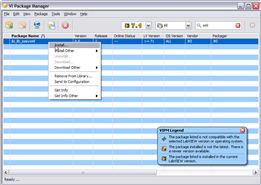
Find the jki_labs_tool_vi_tester package in the package list (hint: type "tester" into the quick search text box to find the VI Tester package). Right-click on it and select the Install right-click menu option, as shown below:


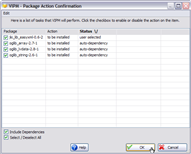
VIPM may ask you if you wish to install other dependency packages, in addition to jki_labs_tool_vi_tester. Make sure that all the dependency packages remain selected and press OK, as shown below.


VIPM will download all required packages and begin the installation process.

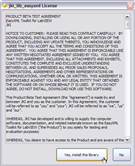
During the installation process, VIPM will present you with a license agreement dialog (shown below) for VI Tester software. If you agree to the terms of the license agreement, press the "Yes" button to proceed with the installation process.


3) Restart LabVIEW
After the installation process completes, restart LabVIEW. You are now ready to start using VI Tester.

What Next? Read the VI Tester Getting Started Guide, of course
回复 顶

使用道具 举报

 楼主| 发表于 2009-2-17 21:06:03 | 显示全部楼层
VI Tester Getting Started Guide

We know that everyone has a different amount of time and interest in learning about VI Tester. So, we've organized the information so that you can digest it at your own pace. We recommend that everyone start at the top and work your way down as far as you have time and interest.

You've got a million things to do.
You're busy so we've put together a quick overview of the software testing features in VI Tester. You've only got a little time to spend.
Great, let's learn the basics and create a test You're very interested, and want to see more.
We're glad you like the idea of creating unit test. If you have any feedback or questions (including ideas for other topics you'd like to learn more about), please consider posting them to the VI Tester Discussion Forums. We're looking forward to your feedback.
回复 顶

使用道具 举报

 楼主| 发表于 2009-2-17 21:06:26 | 显示全部楼层
Frequently Asked Questions (FAQ)


The following are a list of Frequently Asked Questions (FAQ) about VI Tester:

VI Tester is a great idea. How did JKI come up with it?
VI Tester is based on the industry standard xUnit software test architecture that is used in many other programming languages -- this architecture is very flexible and powerful, but also very easy for beginners to learn. So, we can't take credit for inventing the architecture, only for making it available to LabVIEW users.

Why do I need to write software to test my software?
If there are problems (a.k.a bugs) with your software, it's best to know before you ship your software. Unit testing is a great way to validate that the software functions, before it ships. And, unit tests are a great way to capture and communicate software requirements -- if you want to know how a VI is supposed to work, just look at its unit test as an example. Also, if you break functionality in your software, you want to know right away, so that you can make good educated guesses as to which recent changes broke your software. The more time that passes from when the software is broken and when you realize it's broken, the harder it is to find the source of the problem.

I see that VI Tester uses LVOOP to create tests, does VI Tester test VIs that are not in classes?
VI Tester is designed to test VIs. Your test methods must be members of a TestCase class but your test methods can (and should) call project VIs (that do not need to be LVOOP class members). In the example project that ships with VI Tester, we demonstrate how to test the 'Merge Errors.vi' which is standard VI that is located on the 'Dialog and User Interface' palette in LabVIEW. For more information on how to write tests, watch the tutorial video here.

Can I use VI Tester to test my hardware?
We guess you could, but you'd be better off using a tool like NI TestStand, which was designed for testing hardware.

How do I create new tests?
See here.

How do I debug tests?
See here.

What's on the future roadmap for VI Tester?
See here.

Where can I learn more about testing software?

There are a lot of books, websites, and other resources related to software testing.

Here are a few links:

Wikipedia: Books:
回复 顶

使用道具 举报

发表于 2009-6-18 08:58:01 | 显示全部楼层
回复 顶

使用道具 举报

您需要登录后才可以回帖 登录 | 注册

本版积分规则

Archiver|手机版|cpubbs论坛. ( 粤ICP备09171248号 )

GMT+8, 2026-9-28 01:29 , Processed in 0.030031 second(s), 8 queries , Gzip On, File On.

Powered by Discuz! X5.0

© 2001-2026 Discuz! Team.

快速回复 返回顶部 返回列表